Saturday, April 26, 2014

EDUC 7726 - Socratic Seminar Reflection

This past week I had the opportunity to take part in my first ever Socratic Seminar.  Initially I was a little hesitant about the assignment, since I had never taken part in such an exercise.  Prior to class I read through information about the seminar provided by our instructor and watched a few videos examples as well.  What I noticed initially as I observed the first group taking part in the discussion, no two seminars are the same.

As an observer during the first seminar, it was very hard for me not to join in on the discussion.  There were many topics that were discussed that I so desperately wanted to express my opinions and findings from the data, but I knew I could not talk.  I especially wanted to comment on a point that my classmate Tim made about having technology specialist in the schools to help teachers better use technology in their classrooms.  I firmly believe that the data we looked at prior to the seminar demonstrated that teachers truly like to use technology in their classrooms, but some do not feel that they have enough professional knowledge to implement new technologies.  A technology specialist is something I feel is definitely needed in a school or district, but this individual needs to be different than the technology person who works with purchasing and installing software and updating the equipment.  I wonder what the results of survey would look like if schools had technology specialists that provide professional development and instruction to the teachers on the latest and greatest technology uses in the classrooms.

When I had the opportunity to be an active participant in the Socratic Seminar, I found myself multitasking a great deal.  In addition to responding to the opening question, I was listening to my fellow classmates discuss their points and findings while trying to find my own data and findings to contribute to the discussion.  I sort of felt like a member of debate team while watching the opposing side discuss their argument and trying to find information to continue the conversation, but not necessarily contradicting what was said since it was not a debate, but rather a discussion.

The one question that was discussed during my Socratic Seminar session was how teachers could assess students' learning with the use of technology.  I was very interested in this topic because our school uses digital portfolios to gather data on our students and we use it to see the progression they make from year to year with the use of technology.  One of my comments that I made and I still am thinking about the answer to the issue is how to determine the baseline data that we would use for each student to determine if they have learned anything through the use of technology.  It would be important for schools to create a pre and post test that they would use for the students to gather data.  The biggest issue I foresee is that each student could potentially be at different level of competence when it comes to technological abilities.  Schools would need to be prepared to differentiate the instruction for each child depending on their baseline data.

Overall I was very pleased with the Socratic Seminar.  On my drive home from class I was trying to think of different ways I could introduce it into my classroom.  We just recently did a project in my class where the students collected data on different questions pertaining to pizza.  I thought it would be interesting to have students take part in a Socratic Seminar on the findings of their data and even have them research other topics about pizza online.  I could create opening questions about pizza and have them use their findings to validate their responses.  I am sure there are many other ways to integrate the Socratic Seminar into my class and I look forward to exploring many more!

  

Saturday, April 12, 2014

ED 7726 - Week 2 Technology Lesson

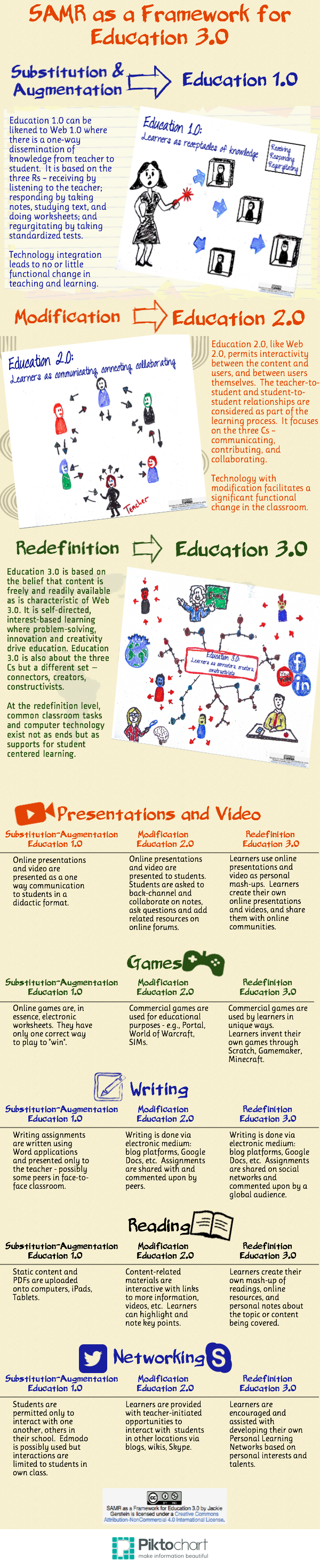
This week through my ED 7726 I had the opportunity to pretend I was a technology leader for a school.  As the technology leader, I was responsible for making recommendations on a lesson and helping a teacher embed technology into their lesson.  As I was making my recommendations I was keeping in mind the Substitution Augmentation Modification Redefinition (SAMR) model designed by Dr. Ruben Puentedura.

If you are not familiar with SAMR, it is a model that offers educators a way to see how they can embed technology into their lessons.  The substitution portion of the model provides teachers with ideas where they can substitute technology in for common practices used in the classroom.  Instead of note taking in a notebook, teachers can have students take notes using a resource such as Simplenote or another online note taking resource.  The important part of the substitution portion is that the teaching and learning does not change due to the implementation of the technology.

The augmentation portion of the model is very similar to substitution.  Prior to cloud computing, many teachers used Microsoft word to create worksheets and handouts for class.  Now teachers are able to create the same resources but using Google Docs.  They can choose the print out the worksheets or they can share the item with their students online if they too have Google accounts.  The sharing of the worksheet is not changing how the teaching or learning is occurring, rather it is providing an alternative way for the students to receive the activity while using technology.

When teachers venture into using the modification portion of the model that is where they will begin to see the teaching and learning change slightly.  With modification, students are able to use technology to have a personal stake in what is produced and learned in the classroom.  While providing recommendations to the lesson I chose to look at for my task this week, I realized that the teacher was initially using the modification stage in the model when she created her lesson.  She was having students work in groups to create a multimedia presentation on the topic of operations with integers.  The students were to choose a topic about integers and create a slide show demonstrating how to solve a problem of that specific topic.  Having the students use a slide show presentation was a way for the teacher to modify the lesson using technology.  She could have simply had the students stand in front of the class and give a lesson, but instead she chose to use technology.

The final portion of the model is redefinition.  In this portion, teachers embed technology to take their students' learning to a level that would not be possible without technology.  A great example of redefinition can be seen again in the lesson I reviewed this week.  After the presentations were complete, students could share their presentation with other students not only in their own classroom and school, but also with students in other schools in other states and countries.  There are a variety of online resources available that can match schools and students up with one another to connect students and allow them to collaborate using the Internet.  

Prior to conducting my review this week, I spent some time researching the SAMR model.  There are many websites that provide excellent ideas for teachers on how to embed technology into their classrooms by using the SAMR model.  The following is a list of only a few that I found that I believe would be very beneficial to any teacher:
Educators Technology Website: SAMR Model resources (This resource also has a variety of images that outline the SAMR model)  

The following pictograph is one of many images that can be found on the site listed above.  This graphic was created by Jackie Gerstein.  The following link will take you to her article: SAMR as a Framework for Moving Towards Education 3.0.  It is in this article that she uses the graphic that she created below to to discuss the SAMR model.


After I spent time researching the SAMR model and reading a study written by Barbara Means that focused on the use of technology and the effects it has on student learning:  Technology and Education Change: Focus on Student Learning, I chose to review a lesson from a Pre-Algebra teacher.  Instead of rewriting the lesson in a different format, I decided to annotate the original lesson.  I did this because if I ever were to become a technology leader in a school, I would not want to rewrite teachers' lessons, rather I would want to make notes and annotate on their original lesson where they could make changes or improvements.

I reached out to three of my fellow colleagues in my ED 7726 course to support me with my review.  Thanks to them, I feel I made very good suggestions and recommendations on how to better utilize technology with the lesson.  In addition, I particularly chose the lesson because I teach Pre-Algebra and could see myself teaching the exact same lesson in my class.  The following link will direct to the annotated version of the lesson with the comments provided by myself and my support system: ED 7726 Annotated Technology Lesson - Elizabeth Ferry  

Saturday, April 5, 2014

EDUC 7726 Week 1 - Aligning Technology With Classroom Standards

Each time I begin a new class through the IT&DML program, I often wonder what new information I will learn.  The first assignment for the EDUC 7726 class has provided me with an opportunity to take my prior knowledge of classroom strategies and standards and align them with technology that will enhance the learning experience for my students.

My fellow classmates provided exceptional examples of how they use technology to support high yield teaching and learning in their classes.  The following is a link to the examples:  Using Technology EDUC 7726 Examples.  I wanted to include these examples in my post because they could be used by a variety of teachers.  In addition, they also demonstrate high yield teaching strategies created by Robert Marzano and John Hattie.

As a teacher, I have sat in plenty of professional developments where the names Marzano and Hattie were  mentioned multiple times as people to reference when providing better instructional strategies in classrooms.  I was familiar with both Marzano and Hattie, but I never actually spent a lot of time aligning their strategies with the use of technology.  In case you are not familiar with both of their strategies, let me give you an overview of what both of these gentlemen use to educate teachers on high yield instructional strategies.

Robert Marzano has nine strategies for high yield instruction strategies.  These nine strategies include:
-  Similarities and Differences
-  Summarizing and Note Taking
-  Reinforcing Effort and Providing Recognition
-  Homework and Practice
-  Non linguistic Representation
-  Cooperative Learning
-  Setting Objectives and Providing Feedback
-  Generating and Testing Hypothesis
-  Cues, Questions and Advance Organizers

John Hattie tested a variety of strategies to determine the effectiveness of each one.  As part of my class, I was asked to view the following presentation about Hattie's findings:  Hattie - Visible Learning Presentation.  In order to better understand the slide show, I decided to view one of Hattie's presentations from a TEDx Talks:

With the slide show and presentation, Hattie describes 130 different factors that could contribute to high yield learning in schools.  I was surprised of the ranking of a few of the influences, but did notice a trend in the top 20 that align very well with Marzano's nine strategies.  Student feedback and providing formative evaluation are two in particular that coincide with Marzano's setting objectives and providing feedback.  We see in today's schools a lot of this type of strategy with the use of online grading systems that allow students to view their current grades, assessment scores and missing homework assignments.  Teachers can even put in comments for students and parents to view.

To further my own education on the topic, I found the following link for a website created by the Manatee County Public Schools in Bradenton, Florida: Manatee School District - Marzano Information.  What I particularly like about this site is that there are links for five of the strategies that direct teachers to online resources.  These resources can be used in a variety of grade and content level classes to help with high yield instruction.

While researching Marzano more, I also found the following wikispace dedicated to the instructional strategies and aligning with the Common Core:  Marzano Strategies - Common Core.  These are more excellent resources that teachers can use to not only provide high-yield instruction, but also align their instruction with Common Core standards.  I do believe that the more technologically advanced are students are becoming, the more creative we as teachers need to be with our instruction.  These resources could help teachers tap into what 21st century learners need in order to succeed.

Friday, April 4, 2014

ED 7724 Introduction - Week 1

Hello everyone!  My name is Elizabeth Ferry and I am currently an 8th grade math teacher at Mauro-Sheridan Interdistrict Magnet School in New Haven, CT.  This is my sixth year teaching.  Prior to becoming a teacher, I was a military officer in the United States Coast Guard.

My husband and I both attended a service academy and after our five year military commitment we decided to leave the military to work in education.  We have an amazing son named Vincent who will be three in less than two weeks and an active puggle named Brady.  Our lives have and always will be dedicated to serving others.

My first experience with integrating Assistive Technology actually occurred before I was a teacher in my sister's classroom.  When I was still serving in the Coast Guard, I would visit her students when I was home on leave.  During my visits I would read to them a book and help co-teach a lesson.  One time, my sister had a student who required the use of a classroom microphone.  Although I felt like I was on Star Search, (for those who remember that show), I really enjoyed using it with a large group of class.  Although I have not had much experience since that time with a classroom microphone, there have been days when I wished I had it in my classroom.

My experience is very limited with other uses of Assistive Technology.  We have utilized the use of tablets, laptops, and Ipad Apps for certain students, but these uses were more for differentiation and not for an accommodation requirement in accordance with an IEP.  I have found that any student can benefit from the use of Assistive Technology as long as it is integrated properly and with purpose.  Money of course is always an issue and after looking at the syllabus I am very excited to research grant opportunities!  I am looking forward to another great course!

Tuesday, March 25, 2014

Love at First MOOC - My Case Study for ED 722

The title of my post describes my overall feeling of the work I completed the past few months through my ED 722 course and the DLMOOC.  I believe that I am much better equipped now than before to explore the possibilities of becoming an online or blended educator.  Prior to this course I never thought I could use an online learning environment for my class, but I am positive now I could structure an effective course.


Initially I was hesitant to even think about the possibility of online learning for my students.  I admit I am a bit of control freak and I could not have imagined not having control of the pace of a course or the constant monitoring of my students’ progress.  As I read through Richard Ferdig’s article:  What Massive Online Open Courses Have to Offer K-12 Teachers and Students I soon learned that there were different types of MOOCs that could be used for different courses. The following is a link to my blog post about this topic which I go into further detail with what I learned: MOOCs - An Obsession for This Lifelong Learner!. In my opinion, the week I wrote the blog post about MOOCs was when I began daydreaming constantly about the different MOOCs I could use in my classroom for my students. Literally I would daydream about the possibilities of how I could incorporate MOOCs into the 8th grade curriculum. It was kind of scary.


Then I was introduced to Tony Gates’ article:  A New Pedagogy is Emerging...And Online Learning is a Key Contributing Factor and I realized that is not so much about the control of the course as it is the design of the course that teachers need to be aware of when creating online learning opportunities.  Student mindsets also play into this equation of creating an online learning course that will engage students, but also challenge them to succeed.  The design of the course and the focus on student mindset were two areas that I paid particular attention to when I worked with Amy Paskov on our high school math transition course.  We did not want to strictly provide the students with lecture after lecture to learn the material, but instead we dispersed games and online assessments throughout the modules which students would use to reinforce the material covered.  The following link will take you to the unit and allow you to see how we designed the modules to allow for learning and entertainment at the same time:  High School Math Transition Course.


There were other online tools that I was asked to use throughout ED 722 and DLMOOC.  Twitter and Storify were the two major resources that I used on a weekly basis to document and curate my learning process through the course.  At the start of the course, I followed 22 individuals and 18 followed me on Twitter.  As of today, 3/24/14, I am following 38 individuals and I have 32 who follow me.  As for Storify, I had 1 Storify follower when the course began and now I have 9 followers.  While I was working with both of these tools I would often talk to my own students about what they had to offer and how I could incorporate them into our classroom.  The majority of students felt that Storify could be interesting to use in class, but they did not really see the use of Twitter, especially if you could pull tweets to use in the Storify.  To quote one of my students, “Twitter is so old and boring.”  After I heard my student state the comment, I realized that Twitter may not be the best tool to incorporate in my middle school classroom due to students’ perception of the resource.  Storify on the other hand is something that my students really want me to use and they asked me to convince the social studies and science teachers to use it with their classes as well.  Both they and I love the ability to compile information from a variety of sources into a single page that is easy to view.


The following are links to my Storifies for each week of the course:

Storify Week 4 - Deeper Learning and Magnet Schools
Storify Week 5 - 21st Century Learning
Storify Week 6 - Cloud Computing
Storify Week 7 - Internships: Real Learning for Real Life
Storify Week 7 - Creative Teachers Engage Their Students
Storify Week 8 - Differentiating Instruction - Technology Focused
Storify Week 9 - Mindsets in Education
Storify Week 10 - Assessing Deeper Learning with Badges and Reflection
Storify Week 11 - Creative Ways to Display Student Work In and Outside the Classroom

On a personal note, I absolutely loved taking part in the DLMOOC.  I cannot wait to have more time to get involved with other MOOCs in the future.  With time constraints in my personal schedule, it was difficult for me to spend as much time as I would have liked with the DLMOOC.  I learned so much from the readings, activities, tweets, and Hangouts that were part of the course, but I am almost positive there were so many other things I could have learned if I had more time.

Once I complete my 6th year certification program, I plan to make it a goal of mine to participate in at least one or two MOOCs a year.  I am a lifelong learner and it excites me to know that there are many opportunities available and they are mostly free!  In addition, if I truly want to incorporate MOOCs into my classroom I should use my own participation as research for how to provide the best online learning experience for my students.  If I get a chance to participate in a variety of MOOCs, I can use my experiences to tailor what best fits the needs of my particular group of students.  I can honestly say that there has never been a course which has prepared me more for what I want to be doing with my future than this course.


Monday, March 24, 2014

Final Reflection Collaborative Unit Plan - ED 722

One of the best parts of going through a graduate program is the opportunity to work with other teachers.  A fellow math teacher, Amy Paskov, and I worked together to create an online math course for students to complete prior to coming to entering high school.  Since I am an eighth grade math teacher and Amy is a ninth grade teacher, we thought working together would be a great partnership.  We both had the interest of our students in mind when we created our unit.   Too many times incoming freshman struggle with basic math skills that they need in order to complete high level math courses in high school.

Prior to completing our unit we wanted to make sure we chose topics that students needed to master prior to attending high school.  The first two modules of our unit covers fractions, decimals, and percents.  These are areas that are vital to higher level math in high school.  Since we know that students have covered these topics numerous times before completing our unit, we wanted to find entertaining and engaging ways to get the students to become proficient in the topics.

One of the readings in the ED 722 course was by Tony Gates.  His article A New Pedagogy is Emerging... and Online Learning is a Key Contributing Factor, identifies using online resources to create a course.  I referenced this article frequently when determining how to construct and create our unit.  With a combination of multimedia, open education resources and education games our unit is designed to help students better understand the topics of fractions, decimals and percents.  The layout of each module takes into consideration that students might not want to listen to lecture after lecture of a topic.  Instead we designed the module to allow students to learn the material, practice it using either a game or online quiz, then watch a few more tutorials and then interact with more games or quizzes.  This will help with keeping the students engaged with the material and not get bored too quickly with the modules.

After the students complete a module, they are asked to complete an assessment using a Google Form.  The results of the Google Form will be sent to both Amy and I or whichever math teachers use the course.  They will use the data to determine what information their students are proficient in prior to coming to high school.  It will also help high school teachers to plan out the first few weeks of classes that are usually set aside for basic math review.

In addition to the Google Form assessment, students will be asked to contribute a blog post for each module about what resource they found most helpful.  This will give the students the ability to discuss their learning process with one another.  It might also provide additional resources that we could use in the unit to help students learn better.  This unit is designed to be used for years and it will constantly be refined and updated to provide the best online learning course for incoming high school freshman.

Amy and I have already discussed how we would like to present this unit to our school district department heads.  Although before we roll it out to be used by two large school districts, I think we need to add a few more modules to the unit to really encompass all of the pertinent information that students need to succeed with high school math.

The following link will take you to the homepage of our unit:  High School Math Transition Course
Feel free to explore the first two modules.  We hope you like what we have created and possibly see a place for it within your school district.


Sunday, March 16, 2014

Student Work Curation and Global Learning - ED 722

The buzz around my school lately has been accreditation.  We are currently finishing our packet and getting ready to send it to the committee that will be visiting our school in May.  Part of the process is compiling evidence that demonstrates what are students are doing in our classes.  In addition we are making sure that our student work is displayed inside and outside our classrooms.

As a math teacher I have been thinking long and hard about how to display my student work.  I have used Pinterest to find ideas of what other math teachers are doing so that the work just doesn't look like paper stapled to a wall.  My students enjoy it when I use decorations or even simply just borders or labels to display their work.  It is obvious to me that the quality of work that they produced is much better when they know someone besides myself will see it.

Since there is an evidence room for the accreditation visit, I asked my principal if we could have more than just stacks of paper and bins of work to show off our students' work.  I told her that we should have a laptop with scrolling pictures of our hallways throughout the year to show the different bulletin boards.  We could also have links to videos and other digital projects that our students have created.  As a technology school our students have a digital portfolio of all work that they created since kindergarten.  In my opinion, these portfolios would be the best evidence we could use to display our students' work.

Technology can be used to not only display student work in school, but it is also a great way to share with the world what our students do everyday.  The Internet provides teachers with a "giant bulletin board" that allows them to share what is going on inside their classrooms with other classrooms around the world.  I can only imagine the care and quality of work that my students would complete if they knew that the world was going to see it.

I also think it would be helpful for my students to use the Internet to see what other students around the world are doing in their classes.  Through the ED 726 Global Literacy course and the readings this week, I have learned about amazing programs that are available that can connect my students on a global level.  I was very impressed when reading the article: International Perspective of K-12 Online Learning.  The article highlighted many countries that encourage online learning.  I was not aware that many of the countries participated in particular programs.  In the future, I hope to use some of the programs mentioned to encourage global learning in my classroom.

I created the following Storify that explains creative ways to display student work:  Storify - Displaying Student Work.  The Storify contains links to different websites and blogs that give excellent and creative ideas on how to display student work.  In addition, there are links to articles that describes how to display student work online.  There is also an example of a website that shows art work created by K-12 students.